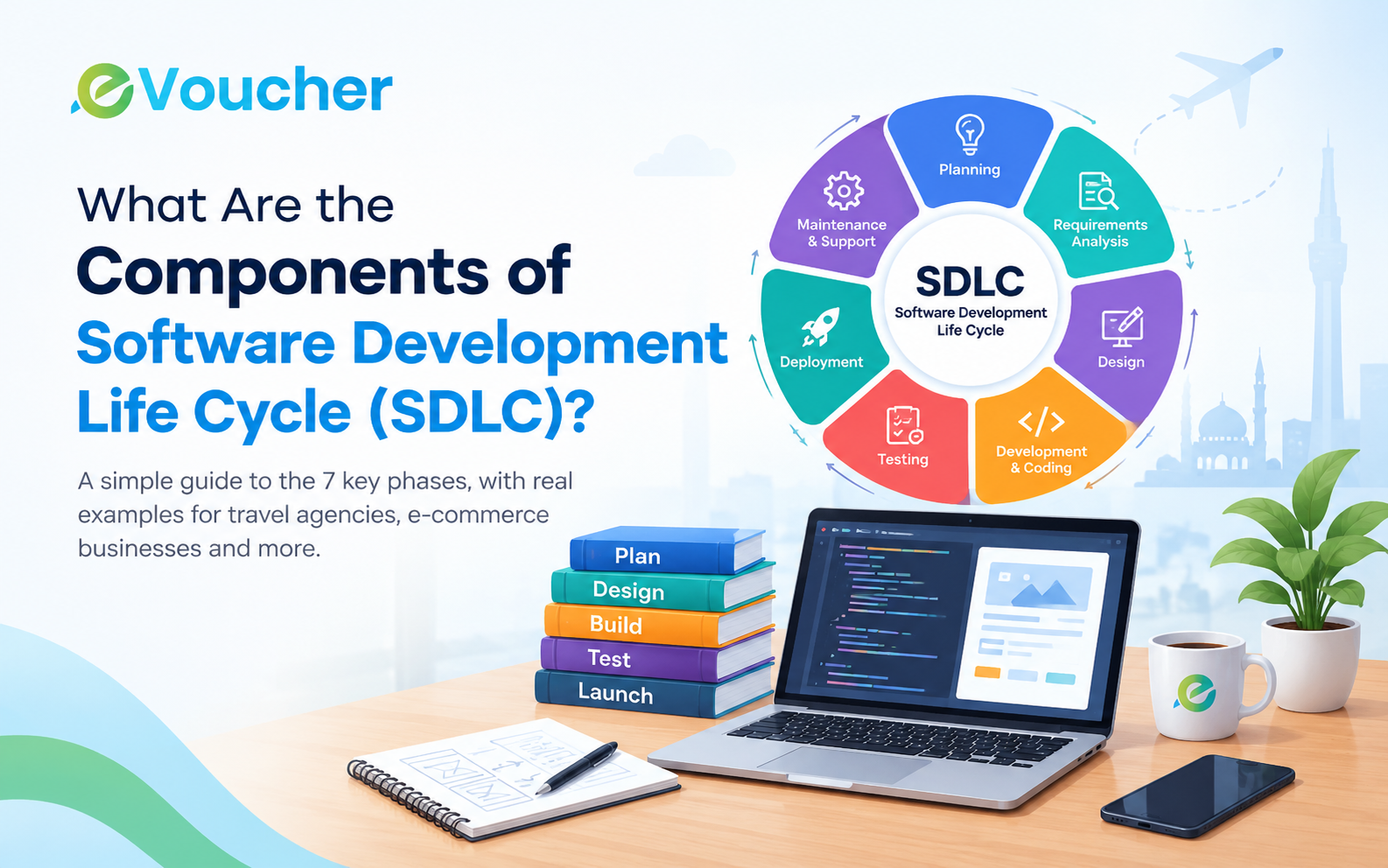
Seven SDLC Phases
The seven commonly recognized phases of the Software Development Life Cycle are:
Planning
Requirements Analysis
Software Design
Development and Coding
Software Testing
Deployment and Implementation
Maintenance and Support
These phases are interconnected. Depending on the methodology, some activities may overlap or repeat as the software evolves.
1. Planning
Planning is the first phase of the SDLC. It establishes what the software needs to accomplish, who will use it, how much development may cost, and what resources are required.
Before starting development, businesses and software teams should agree on the project's objectives, scope, timeline, budget, and expected outcomes.
Key activities
Define business objectives and project scope.
Identify the target users and their problems.
Estimate development costs and timelines.
Assess technical and operational feasibility.
Identify potential risks and resource requirements.
Establish project milestones and priorities.
Example for Pakistani businesses
Suppose a travel agency wants to replace its manual booking records and spreadsheets with a centralized management system.
During planning, the agency identifies its main needs: booking management, customer records, financial reporting, supplier information, and staff access controls. The team also considers its budget, existing workflows, and future expansion plans.
The outcome: A preliminary project plan that establishes the software's purpose, scope, priorities, and estimated resources.
Good planning helps businesses avoid spending money on features that do not address their actual requirements.
2. Requirements Analysis
Requirements analysis translates business objectives into specific software functions and technical expectations.
During this phase, developers, business analysts, and stakeholders discuss how the software should work. They distinguish essential features from optional improvements and document the requirements before development progresses.
Requirements generally fall into two categories:
Functional requirements: What the software must do, such as generate invoices, record payments, manage bookings, or calculate inventory balances.
Non-functional requirements: How well the software must perform, including security, reliability, usability, response time, and scalability.
Key activities
Interview stakeholders and prospective users.
Document functional and non-functional requirements.
Map existing business workflows.
Identify integrations with external systems.
Define user roles and access permissions.
Prioritize features and establish acceptance criteria.
Example for travel agencies and e-commerce businesses
A travel agency may require flight booking management, customer ledgers, supplier payments, and sales reports. An e-commerce business may need product management, order processing, stock tracking, and sales reporting.
These businesses have different workflows, so their software requirements should reflect their operations rather than relying on a generic feature list.
For accounting software, requirements should also clarify how transactions are recorded, how reports are calculated, and how financial records can be reviewed.
The outcome: A documented requirements specification that explains what the software must deliver and how stakeholders will evaluate whether it meets their needs.
3. Software Design
The design phase determines how the software will be structured and how users will interact with it.
Developers and designers use the approved requirements to plan the user interface, database structure, application architecture, integrations, and security controls.
A well-designed application should be practical for its intended users, not simply attractive on screen.
Key activities
Create wireframes and user interface designs.
Plan the database and information structure.
Select suitable technologies and architecture.
Define system integrations and communication between components.
Plan authentication, permissions, and data protection.
Review usability across desktop and mobile devices.
Example for a Pakistani business
Consider cloud-based accounting software for a travel agency. The design may include separate modules for customer accounts, supplier accounts, cash and bank transactions, expenses, invoices, and financial reports.
A clear dashboard should allow authorized staff to find important information without navigating through unnecessary screens.
For an e-commerce business, the design may focus on product listings, inventory records, order processing, customer information, and sales reports.
The outcome: A software design specification, architecture plan, and interface designs that guide the development team.
Design decisions made at this stage can affect future maintenance costs, system performance, and the ease of adding new features.
4. Development and Coding
Development is the phase in which the approved design is translated into working software.
Programmers write the application code, build individual modules, configure databases, connect required services, and implement the features documented during requirements analysis.
For larger projects, development is usually divided into smaller tasks so that different modules can be built and reviewed efficiently.
Key activities
Write and review application code.
Develop the frontend and backend.
Build and configure database structures.
Integrate APIs and external services.
Implement authentication and access controls.
Maintain code documentation and version control.
Perform unit testing during development.
Example: Accounting software development
A development team building accounting software may create separate modules for customer accounts, invoices, receipts, expenses, and financial reporting.
These modules must work together correctly. For instance, recording a payment should update the relevant account balance and appear appropriately in the associated financial records.
Similarly, an e-commerce system must connect product availability, customer orders, payment processing, and order status management.
The outcome: A working software application or set of functional modules ready for systematic testing.
Developers should also follow secure coding practices throughout this phase instead of postponing security considerations until the software is almost complete.
5. Software Testing
Software testing checks whether an application works as intended and meets its documented requirements.
A feature may appear to work during development but fail when it interacts with another module, processes unexpected information, or handles multiple users. Testing helps identify these problems before they affect customers or business operations.
Common types of software testing
Unit testing: Checks individual functions or components.
Integration testing: Verifies that connected modules work together.
System testing: Evaluates the complete application.
User acceptance testing (UAT): Checks whether the software meets real business requirements.
Security testing: Identifies vulnerabilities and access-control weaknesses.
Performance testing: Evaluates responsiveness and behavior under expected workloads.
Example for travel and accounting software
A travel agency's software should be tested to confirm that booking records, customer balances, supplier payments, and financial reports remain consistent when users perform routine operations.
An e-commerce platform should be checked for problems involving product availability, checkout, payment confirmation, order creation, and stock updates.
Testers should also examine error scenarios, such as failed payments, duplicate submissions, incorrect user permissions, and interrupted transactions.
The outcome: A tested application with documented issues, corrected defects, and evidence that the software meets its agreed acceptance criteria.
Testing is not limited to a single stage in every SDLC methodology. Agile and continuous delivery teams often test software throughout development.
6. Deployment and Implementation
Deployment is the process of making the tested software available in its intended operating environment.
This may involve launching a web application on a production server, configuring cloud infrastructure, migrating existing data, setting up user accounts, and preparing staff to use the system.
A successful deployment requires more than making the software accessible. The business must also be ready to use it in daily operations.
Key activities
Configure the production environment.
Deploy the approved software release.
Set up users, permissions, and system settings.
Migrate existing data when required.
Configure integrations and backups.
Provide user training and documentation.
Monitor the initial release for operational problems.
Example for Pakistani businesses
A company moving from spreadsheets to cloud accounting software may need to import existing customer records, supplier information, opening balances, and other approved data.
Before going live, the business should verify the imported information, confirm user permissions, and ensure that essential reports work correctly.
A travel agency launching a booking portal may also need to configure its available services, test booking workflows, verify integrations, and train employees.
The outcome: Software that is available for its intended users, supported by the necessary configuration and implementation processes.
For business-critical systems, a phased rollout may be preferable to switching every user to a new system at once.
7. Maintenance and Support
Software development continues after launch. Maintenance keeps the application reliable, secure, and useful as business needs and technology change.
After deployment, users may report defects, request improvements, or encounter new operational requirements. Development teams investigate these issues and release appropriate fixes and updates.
Key activities
Fix software defects.
Apply security patches and dependency updates.
Monitor performance and system availability.
Resolve technical support issues.
Improve usability and existing features.
Update integrations when external systems change.
Adapt the software to new business requirements.
Example: Growing an e-commerce business
An online store may initially manage a limited product catalogue but later require additional inventory controls, new payment integrations, improved reporting, or connections to delivery services.
Maintenance allows the software to evolve without requiring the business to rebuild the entire application every time its needs change.
Likewise, travel agencies may need updated integrations, improved booking workflows, or additional reporting features as their operations expand.
The outcome: Software that continues to support business operations through ongoing fixes, updates, monitoring, and planned improvements.
Maintenance should be considered when estimating the total cost of software ownership, not treated as an unexpected expense after launch.



.jpg)